Android panel for crosshair, sensitivity and telemetry
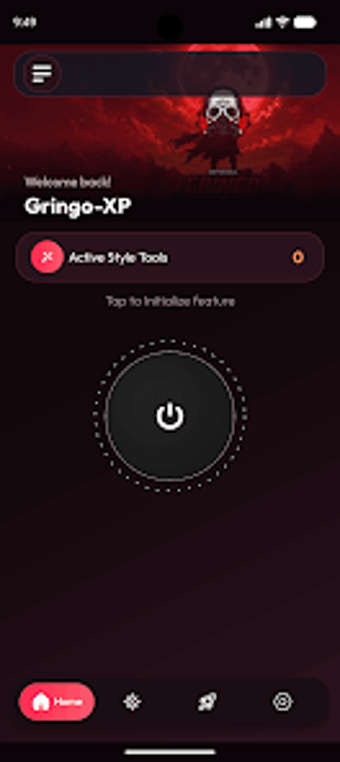
Gringo XP Freestyle Panel FF from NO PERFECT PEOPLE is an Android personalization utility for mobile battle-royale players, designed to surface aiming and device metrics outside the game. The app places crosshair editors, custom aim configuration and sensitivity sliders alongside live telemetry such as FPS, refresh rate and battery temperature. With a modern settings panel optimized for Android devices, it targets Free Fire and Free Fire MAX players who want tighter control and real-time performance awareness.
Gringo merges aiming controls into a fast-access in-game panel
Gringo consolidates aiming tools and adjustments into a single overlay for mobile shooters. The interface exposes crosshair editing, aim configuration and sensitivity sliders via a fast-access settings panel so players can change aiming behavior without leaving a match. This arrangement focuses on keeping core aiming controls immediately reachable during play rather than forcing users into separate menus.
Gringo provides granular aiming and panel personalization for advanced players
The app's Freestyle panel approach supports high levels of UI personalization alongside explicit aim tuning. It offers advanced crosshair customization, dedicated custom aim configuration tools and sensitivity controls that let technically inclined players assemble and apply personalized aiming setups. The panel emphasizes quick adjustments, which helps players iterate on aim behavior during short testing sessions.
Gringo monitors device telemetry while remaining lightweight on Android
The tool includes performance monitoring utilities geared toward gameplay: FPS and refresh-rate tracking, battery temperature readouts and RAM/storage indicators. The developer describes the design as lightweight and optimized for smooth operation on Android devices, and the fast-access panel reduces in-menu time. Regular updates aim to keep those telemetry and optimization features aligned with recent system changes.
Installation and compatibility match typical Android gaming setups
Available for Android devices, the app supports most modern Android versions and receives periodic updates to maintain compatibility. The developer focuses on utility and personalization tools for mobile gaming, and community feedback highlights the modern interface and handy performance readouts during sessions. The app targets Free Fire and Free Fire MAX players who prefer on-device configuration over in-game menus.
Gringo is a practical choice for players who want hands-on tuning
Gringo is a practical option for battle-royale players who prefer direct control of aiming behavior and live performance awareness in a single interface. It is an independent utility and not affiliated with the official game publishers, a consideration for players mindful of overlay tools. For those willing to invest time in panel configuration, it suits players seeking tighter, on-device control during matches.